Your PPM software is live. Training is complete. Six months later, your PMO is still running reports in spreadsheets. Sound familiar? According to PMI research, most PPM initiatives fail not because of technology—but because organizations treat adoption as a go-live event rather than an ongoing capability. Trusted IT Group helps enterprise PMOs fix these adoption failures by focusing on what matters: governance, data standards, and change management that restore real-time portfolio visibility.
This guide walks you through seven actionable steps to diagnose why your PPM adoption stalled and how to get it back on track. By the end, you'll have a clear remediation roadmap tailored for Microsoft 365 environments.
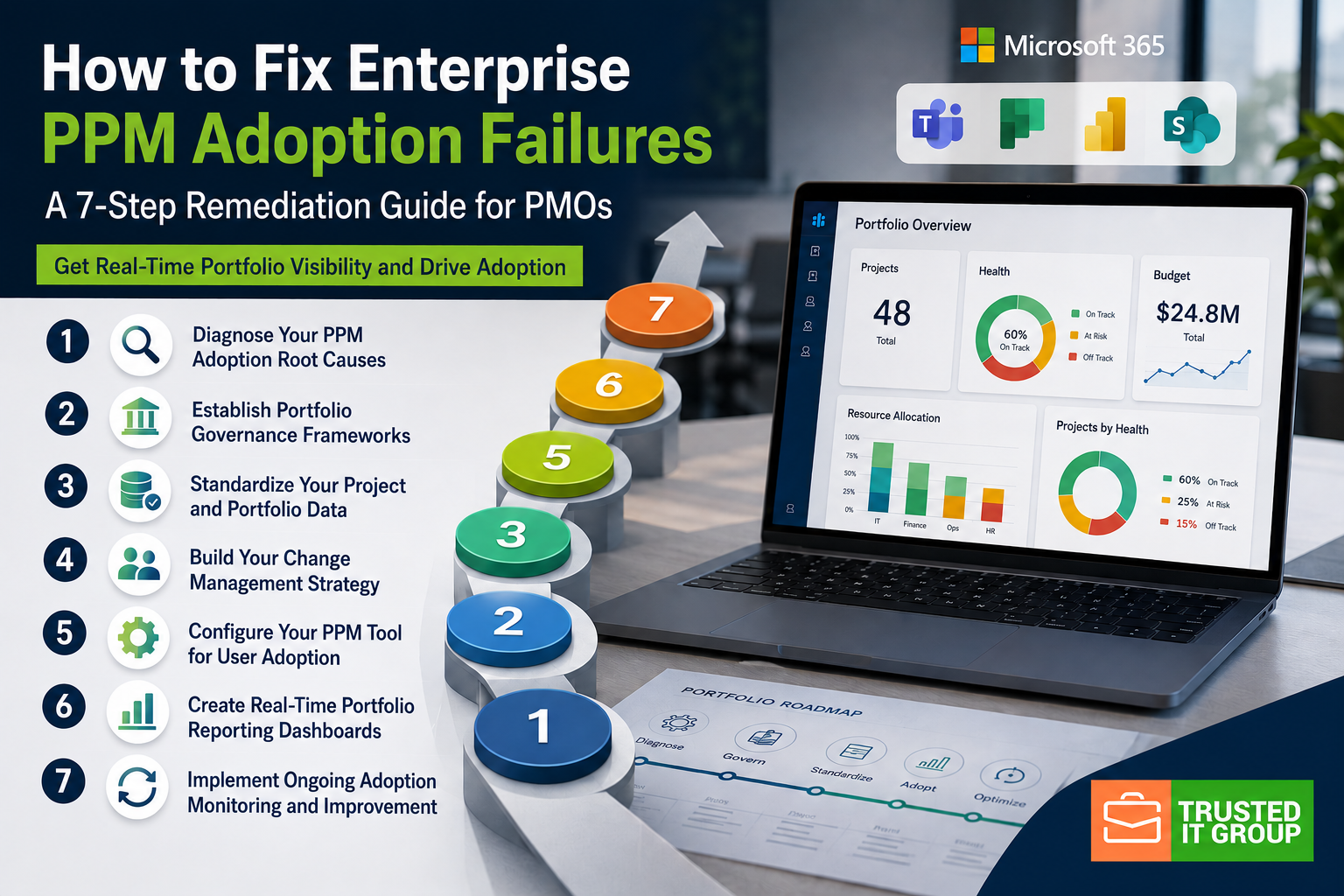
Quick Guide: How to Fix Enterprise PPM Adoption in 7 Easy Steps
- Diagnose Your PPM Adoption Root Causes — Identify whether failures stem from governance gaps, data issues, or change resistance.
- Establish Portfolio Governance Frameworks — Define decision rights, approval workflows, and accountability structures across portfolios.
- Standardize Your Project and Portfolio Data — Create consistent data definitions and entry standards for reliable reporting. Trusted IT Group's PPM 365 accelerates this through Microsoft 365 integration.
- Build Your Change Management Strategy — Design adoption plans that address different stakeholder needs and resistance points.
- Configure Your PPM Tool for User Adoption — Simplify interfaces and workflows to reduce friction for project managers.
- Create Real-Time Portfolio Reporting Dashboards — Build dashboards that surface portfolio health and resource conflicts automatically.
- Implement Ongoing Adoption Monitoring and Improvement — Track adoption metrics and iterate on your approach over time.
How to Fix Your Enterprise PPM Adoption Failures
1. Diagnose Your PPM Adoption Root Causes
Start by identifying exactly where your PPM adoption broke down. Common root causes fall into three categories: governance gaps, data quality problems, and change resistance. Interview your project managers, PMO leaders, and executives separately to understand their perspectives.
Look for symptoms like inconsistent data entry, parallel tracking in spreadsheets, or executives who never log into the system. Each symptom points to a specific underlying cause. Governance gaps show up when nobody enforces data standards. Data quality issues appear when definitions vary across departments.
Change resistance manifests when your team sees the PPM tool as extra work rather than a benefit. Document your findings in a root cause matrix that maps symptoms to causes. This diagnosis becomes your roadmap for the remaining steps.
2. Establish Portfolio Governance Frameworks
Define who has authority to make portfolio decisions and how those decisions get made. Your governance framework should specify decision rights at each level—from individual project approvals to portfolio rebalancing. Without clear governance, your PPM tool becomes a data repository that nobody acts on.
Create a governance charter that documents your portfolio review cadence, escalation paths, and approval thresholds. Specify which metrics trigger reviews and who participates in each type of decision. According to PMI's Governance Practice Guide, effective governance distinguishes between oversight levels and identifies common elements across portfolios, programs, and projects.
Tie your governance framework to executive accountability. When senior leaders own portfolio outcomes, they have incentive to enforce the standards that make governance work.
3. Standardize Your Project and Portfolio Data
Data standardization eliminates the "garbage in, garbage out" problem that undermines portfolio visibility. Start by creating a data dictionary that defines every field in your PPM system. Specify required versus optional fields, valid values, and who owns data quality for each element.
Focus first on the data that drives your key portfolio decisions: project status indicators, resource allocations, financial forecasts, and milestone dates. Establish validation rules that prevent inconsistent entries. For example, if a project shows "green" status but has missed three milestones, your system should flag the inconsistency.
Roll out data standards in phases. Begin with high-visibility programs where executive attention reinforces compliance. As those programs demonstrate success, expand standards to the broader portfolio.
4. Build Your Change Management Strategy
Different stakeholder groups have fundamentally different relationships with your PPM tool—and your change strategy must account for this. Portfolio leaders want insight without input; they need status in 30 seconds with risks surfaced automatically. Project managers are the engine of the system; for them, friction is the enemy.
Design adoption plans for each persona. Executives need curated dashboards they can view on mobile. Project managers need streamlined data entry that saves them time compared to spreadsheets. Team members need task lists that integrate with tools they already use like Microsoft Teams and Planner.
Create a communication plan that explains the "why" behind PPM adoption. When your team understands how the tool helps them—not just the organization—resistance decreases. Schedule regular touchpoints to gather feedback and adjust your approach.
5. Configure Your PPM Tool for User Adoption
Simplify your PPM tool configuration to remove barriers to adoption. Hide fields your team does not need right now. Start with phase-level task tracking rather than detailed task schedules that become maintenance burdens. Build templates that enforce your standards automatically.
Integrate your PPM tool with the applications your team already uses daily. For Microsoft 365 environments, connect portfolio data to Teams, Planner, and Power BI. This reduces the perception that PPM is "another system to update." Trusted IT Group gives you this integration through PPM 365, connecting portfolio oversight directly to Microsoft Planner and Teams workflows.
Configure role-based views so each stakeholder sees only what they need. Project managers see their assigned projects. Portfolio leaders see cross-portfolio metrics. Executives see strategic alignment dashboards. This personalization reduces complexity and increases engagement.
6. Create Real-Time Portfolio Reporting Dashboards
Build dashboards that answer the questions your executives actually ask. Start with a simple portfolio health view showing project status, budget consumption, and resource utilization across all active initiatives. Add drill-down capability so leaders can investigate issues without requesting separate reports.
Include leading indicators that surface problems before they become crises. Track task completion rates against plans, defect trends, and resource overallocation. When dashboards show issues early, your governance processes can intervene while corrective action is still possible.
Automate report distribution so stakeholders receive updates on a predictable schedule. When executives know they will get portfolio status every Monday morning, they stop interrupting project managers with ad-hoc requests. This predictability reinforces adoption across all levels.
7. Implement Ongoing Adoption Monitoring and Improvement
Measure adoption with specific, objective criteria rather than subjective assessments. Track login frequency, data entry completeness, and report consumption. Calculate the percentage of projects actively maintained in your PPM tool versus those tracked elsewhere.
Hold monthly adoption reviews where you analyze metrics and identify improvement opportunities. When you spot teams reverting to spreadsheets, investigate why. Often, you will discover a configuration gap or training need that you can address quickly.
Plan for iterative improvement. Your initial PPM deployment will not be perfect. As your organization matures, add capabilities gradually: start with basic project tracking, then add resource management, then portfolio optimization. This phased approach prevents the "big bang" failures that overwhelm teams with too much change at once.
What Causes Most Enterprise PPM Software Adoptions to Fail?
Most PPM adoptions fail because organizations treat implementation as a technology project rather than a behavioral change initiative. The software gets deployed, training gets delivered, and then nothing changes because the people who were supposed to change how they work have not been given a compelling reason to do so.
Four interconnected factors drive most failures:
- Lack of executive leadership — Senior managers do not drive compliance or model the behaviors they expect from others
- Underdeveloped management skills — Project managers do not understand how PPM standards make their lives easier
- Overly aggressive scope — Organizations try to implement too many features at once, overwhelming their teams
- Onerous data requirements — Methodology and reporting demands add work without visible value
The fix requires recognizing that different stakeholder groups have fundamentally different needs. Portfolio leaders want insight without data entry. Project managers want tools that reduce their administrative burden. Executives want confidence that portfolio decisions are based on accurate information.
How Long Does It Take to Restore Portfolio Visibility After Adoption Failure?
Restoring portfolio visibility typically takes 12 to 16 weeks for a mid-sized PMO, assuming you have executive support and dedicated resources for the remediation effort. The timeline depends on the severity of your current adoption gaps and the complexity of your portfolio.
The first four weeks focus on diagnosis and governance design. You will interview stakeholders, document root causes, and create your governance framework. Weeks five through eight concentrate on data standardization and change management planning. This is where you build the foundation for sustainable adoption.
Weeks nine through twelve involve tool configuration, dashboard creation, and piloting with select programs. The final four weeks expand adoption across your portfolio while monitoring metrics and adjusting your approach. Rushing this timeline usually backfires because sustainable behavior change requires time for new habits to form.
How Trusted IT Group Helps You Fix PPM Adoption Failures
Trusted IT Group brings years of Microsoft-focused expertise to enterprise PPM challenges. As a Gold Microsoft Partner, we understand how to connect portfolio governance to the Microsoft 365 tools your team already uses—Teams, Planner, Power BI, and the broader Power Platform ecosystem.
Our PPM 365 solution is built specifically for organizations managing multiple projects who need portfolio-level visibility without forcing project managers into a separate system. PPM 365 organizes your projects into portfolios and programs while integrating directly with Microsoft Planner for day-to-day task management. This means your project managers work where they are comfortable while portfolio leaders get the oversight they need.
We do not just deploy software. Trusted IT Group delivers the consulting expertise to diagnose your adoption root causes, design governance frameworks that fit your organization, and build change management strategies that stick. Our team has helped PMO directors across industries restore real-time portfolio visibility and make data-driven decisions about their project investments.
Ready to fix your PPM adoption failures? Contact Trusted IT Group for a discovery call to discuss your specific situation and how we can help.
FAQs about How to Fix Enterprise PPM Adoption Failures
What is the most common reason enterprise PPM adoption fails?
The most common reason is treating adoption as a go-live event rather than an ongoing capability. Organizations invest heavily in software and training but underinvest in the behavioral change required to make it stick.
Trusted IT Group addresses this by focusing on governance and change management alongside technical implementation. Without executive leadership enforcing standards and project managers seeing clear benefits, even the best PPM tools become expensive shelfware.
How do I know if my organization needs to fix its PPM adoption?
Watch for these warning signs: project managers still track work in spreadsheets alongside your PPM tool, executives request reports that require manual data consolidation, portfolio status updates surprise stakeholders, and data quality varies significantly across projects.
If your team views the PPM tool as extra administrative work rather than a helpful capability, your adoption needs attention. Trusted IT Group helps you diagnose these symptoms and trace them back to fixable root causes.
Can I fix PPM adoption without replacing my current tool?
Yes, in most cases you can improve adoption without switching platforms. The tool is rarely the primary problem—governance gaps, data quality issues, and change resistance cause most adoption failures regardless of which software you use.
Focus first on simplifying your current configuration, establishing clearer governance, and addressing stakeholder concerns. If your tool genuinely lacks critical capabilities for your organization, Trusted IT Group can help you evaluate alternatives like PPM 365 that integrate with your existing Microsoft 365 environment.
How do I get executive buy-in for PPM adoption remediation?
Frame the conversation around business outcomes rather than technology. Quantify the cost of poor portfolio visibility: delayed decisions, resource conflicts discovered too late, projects that drift from strategic objectives without early intervention.
Trusted IT Group recommends presenting concrete scenarios: "Last quarter, we discovered Project X was three months behind after committing additional resources to Project Y. With proper portfolio visibility, we could have rebalanced six weeks earlier and saved $200,000." Executives respond to business impact, not system features.
What role does data standardization play in PPM adoption success?
Data standardization is the foundation that makes everything else work. Without consistent definitions and entry standards, your dashboards show misleading information, your governance processes operate on unreliable data, and project managers lose trust in the system.
Trusted IT Group helps you create data dictionaries, validation rules, and quality monitoring processes that ensure your portfolio data supports confident decision-making. When executives can trust what they see in the PPM tool, they stop requesting manual reports and start relying on the system.
How does Microsoft 365 integration improve PPM adoption rates?
Microsoft 365 integration reduces adoption friction by meeting project managers where they already work. When task updates in Microsoft Planner automatically flow to portfolio dashboards, project managers do not see the PPM tool as extra work—they see it as a capability that enhances their existing workflows.
Trusted IT Group's FridayReprot.ai is built on Microsoft 365 and Planner, making this integration native rather than bolted on. Your team continues using familiar tools while leadership gains the portfolio visibility they need.